Actions During Use
When you successfully take a vehicle, an Active vehicle handover block appears on the main Dashboard. Here you can perform actions related to the active trip.
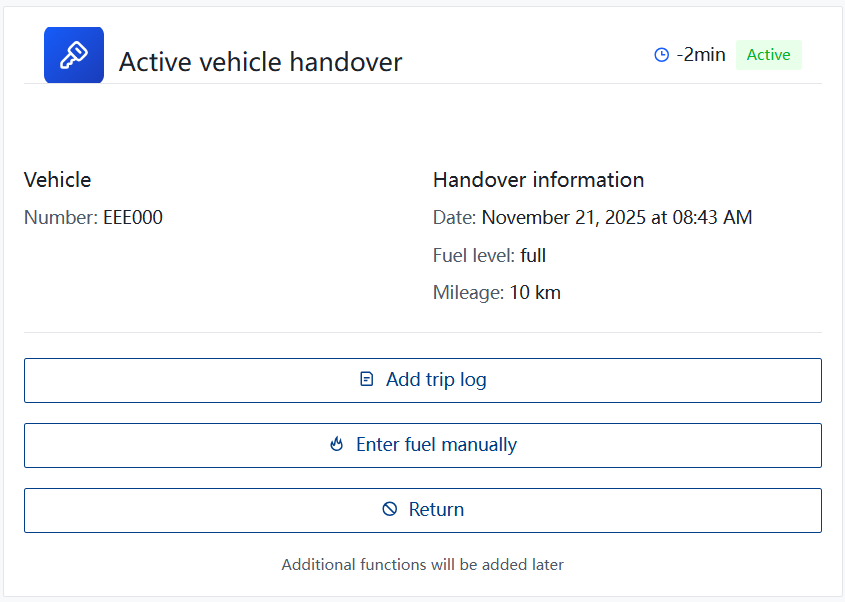
1. Add trip log
This button is for manual trip registration.
- Automatic Tracking (GPS): Most company vehicles have GPS equipment. In this case, the system automatically records routes and mileage. Clicking the button will notify you that manual entry is not required.
- Manual Entry: If the vehicle does not have GPS, a form will open where you must specify:
- Route (from - to).
- Distance traveled (km).
- Purpose of the trip.

2. Enter fuel manually
This function is used to register fuel refills when the company fuel card is not used.
Important
If a fuel card is assigned to the vehicle, the system will show a warning. Use this function only in exceptional cases (e.g., lost card or refueling abroad with cash), as fuel card data comes in automatically.
In the form, you need to specify:
- Date and time.
- Fuel amount (liters).
- Price (total or per liter).
- Odometer reading at the time of refueling.
- Attach a photo of the receipt.

success
✅ Information complete and verified.